







Getting an Account
There are two types of accounts in the RRC Online System:
- Security Administrator - Creates and maintains Filer accounts for those with the company who need to file forms through the RRC Online System. See the Becoming a Security Administrator page for more information.
A Security Administrator can also be a Filer. In order for the Security Administrator to file online, they must first create a new Filer account in their name. - Filer - Creates and submits filings using the RRC Online System.
Security Administrators cannot perform online filing, unless they create their own account as a Filer. If you need a Filer account, contact your company's Security Administrator.
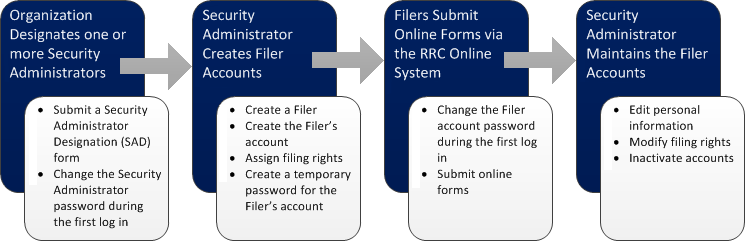
The graphic below shows the overall process for creating and managing RRC Online System accounts.
For further assistance, or if you have any questions, contact the RRC at RRCOnline-Security@rrc.texas.gov.